
BuiltWith has been the go-to tool for tech stack detection for a long time. It tracks over 85,000 technologies across 673 million websites, and it's probably the #1 tool people associated with the term "technographics".
But it's definitely not perfect. For starters, it focuses a lot on frontend technologies and frameworks, and not so on backend stuff. Second, the pricing can be pricey, especially if you're just looking for data on 1-2 technologies ($295/month).
Since I have no life, I decided to take this Halloween weekend to test a few alternatives. I tried to test different ones, each focusing on a specific niche, whether it's backend tech detection, technographics from job postings, or ecommerce data. Hopefully you'll find an alternative that fits your specific needs.
Below were the 10 alternatives I tried, with the top 5 I would recommend:
- Bloomberry - best for backend tech detection plus adoption and churn timing
- Wappalyzer - best for real-time browser-based detection
- Store Leads - best for ecommerce store and Shopify app data
- TechPeeker - best for lead generation based on CMS and frameworks
- JobsPipe - best for technographics pulled from job postings
- Hunter TechLookup
- NerdyData
- WhatRuns
- urlscan.io
- Chrome Developer Console + Claude
1. Bloomberry - Backend Tech Detection and Timing
Best for: Sales teams targeting enterprise buyers who need backend visibility and the date a company adopted or dropped a product.
Bloomberry, unlike BuiltWith doesn't just scan websites for scripts. It reads infrastructure signals. To be exact, it reads DNS records, new subdomains, certificate transparency logs and the config inside script files. That's how it picks up stuff that never shows up on a homepage: CRMs like Hubspot, ERPs, security tools, AI tools, and more.
The other big difference is adoption and churn dates. Every company comes with the date it adopted a product, the date it dropped it, or a renewal coming up. This is particularly useful for those that need timely signals on when to reach out to a company.
Testing it out
I picked Okta, since BuiltWith can't really see it (Okta logins live on subdomains like company.okta.com, not the marketing site).
Bloomberry found 14,453 companies using it. The table is sorted by when each company started. The first few rows show companies that adopted Okta that same day. The next few (Hightouch, Linedata, Forward Air) were all from the past week.
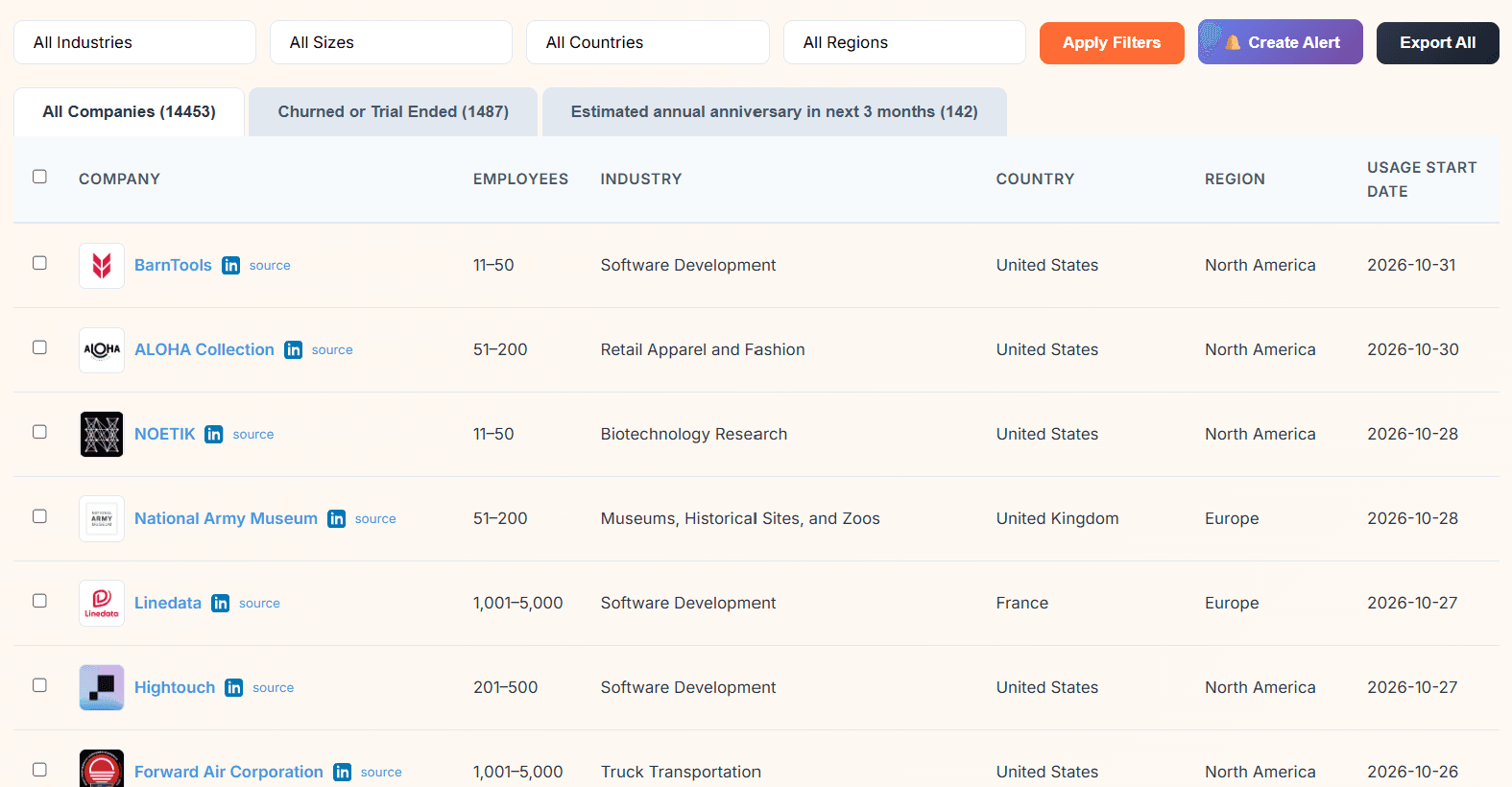
Then I clicked over to the "Churned or Trial Ended" tab: 1,487 companies, with churn dates. The latest was a bank that dropped Okta the day before. If I sold a competing identity product, this is the tab I'd focus my prospeting on. A company that just left Okta is most likely looking for a replacement.
But is the data actually right?
Big numbers are easy, and anyone can make up a long list of companies. I wanted to know if these companies were real Okta customers, so I filtered to 10,001+ employees (721 companies) and spot-checked five: Walmart, Novo Nordisk, Etihad, Gentiva and Camping World.
The nice thing is that every row has a little "source" link that points to the company's Okta login page (like etihad.okta.com). So I clicked through each one to verify.
First, a sanity check: I typed in a made-up one, notarealcompany8472.okta.com. You get a plain, generic "Sign In" page with no company name on it. So a page that just loads doesn't prove anything.
The real ones looked different. All five redirected to a proper Okta sign-in with the company's name in the page title ("Walmart - Sign In", "Etihad Airways - Sign In" and so on). And two of them, Etihad and Camping World, had fully customized their login page with their own logo and photos. You don't bother doing that for an Okta account you're not using.

So 5 out of 5 checked out. For Walmart, Novo Nordisk and Gentiva, I can confirm the Okta account exists under their name, but not exactly how much they use it. That's about as far as you can verify from the outside.
Checking a company's tech stack
Next I flipped it around and looked up hightouch.com. I got about 70 products back: Glean, Linear, Vanta, ConductorOne, Databricks, Spacelift, Chili Piper and so on. Pretty much none of those would show up on a homepage scan.
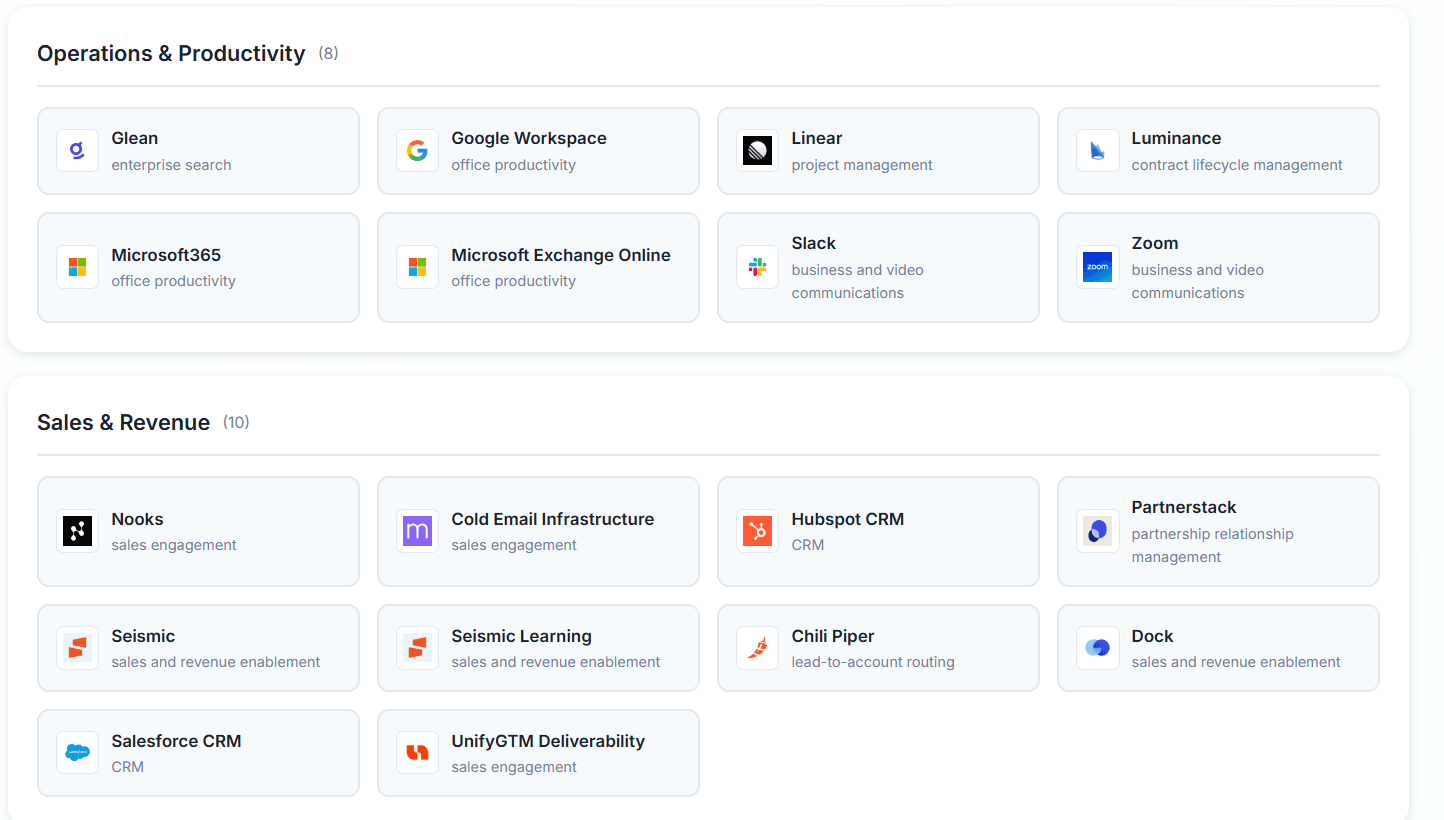
I went looking for public proof. Hightouch's own subprocessor list names Glean, Chili Piper, Salesforce, Omni Analytics, Slack and AWS, all six of which Bloomberry had. A Hightouch job posting mentions Glean too. Their Vercel preview sites (like site.vercel.hightouch.com) show up in Google, which backs up the Vercel detection. Vanta checked out too: Hightouch's trust center runs on Vanta's Trust Center product (you can tell from the page's preview image, which is served from app.vanta.com). The only one I couldn't confirm publicly was ConductorOne, which isn't surprising since companies rarely announce their identity governance tooling.
Two small gripes. The company view doesn't show dates (the vendor pages do), so I couldn't tell if Hightouch added Vanta last week or three years ago. And it lists both HubSpot and Salesforce CRM without saying which one matters more. Based on the subprocessor list, it's Salesforce, but I had to go find that myself.
Where it falls short
Frontend stuff, mostly. For example, I searched "jQuery" and got "No results found." It doesn't track React, another popular JS framework, or WordPress themes either. If that's what you need, BuiltWith wins, and it's not close.
There's also no Chrome extension yet, so you'll have to log into the app to look a company up.
Strengths:
- Detects backend software with no website footprint
- Adoption and churn events with dates attached, not static snapshots
- Churn verified by checking whether the integration still works
- A "source" link on every row, so you can check the evidence yourself
- Email and Slack alerts on adoption, churn and renewals
- REST API for platforms embedding the data
Limitations:
- Almost no coverage of JavaScript frameworks, CMS platforms or WordPress themes
- Not built for massive general-purpose frontend lists
- No contact data, company-level signals only
- Churn signals lag adoption by 1-2 weeks because they're validated first
- Company tech-stack view has no dates and doesn't flag which overlapping tool is primary
Pricing: Free trial, no credit card required. Paid plans from $199/month
2. Wappalyzer - Real-Time Detection
Best for: Sales reps needing instant tech visibility during prospect research, and anyone who needs technologies that only appear on deeper pages.
Like BuiltWith, Wappalyzer is mostly about frontend detection. The big difference is where its data comes from: a big chunk is from people running its browser extension, so it sees whatever pages those users visit, including checkout pages, logged-in dashboards and multi-step forms that a crawler never reaches. BuiltWith, on the other hand simply does web crawling.
Testing it out
The free account gets you 50 lookups a month, so I started by looking up hightouch.com to compare it with Bloomberry.
It found... three technologies: Next.js, React and Vercel. That's it. Yeah, really.
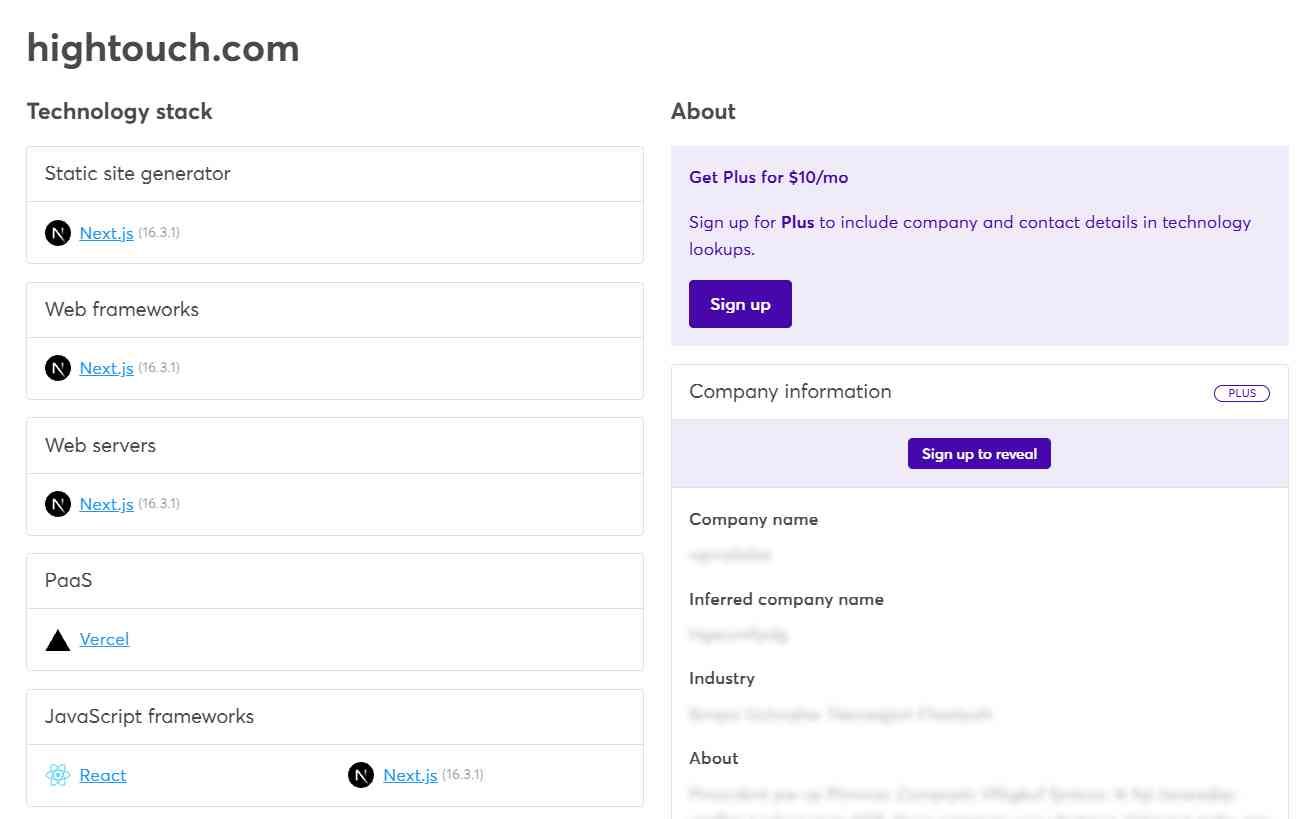
To be fair, Hightouch's homepage loads very little before you accept cookies. But when I opened the site myself, the site was also loading Sanity (their CMS) and Sentry (error tracking), and Wappalyzer missed both. It also identified the wrong version of Next.JS - it claimed HighTouch was running Next.js 16.3.1 when the live site was on 16.4.1. Company and contact info is blurred out unless you pay $10/month for "Plus."
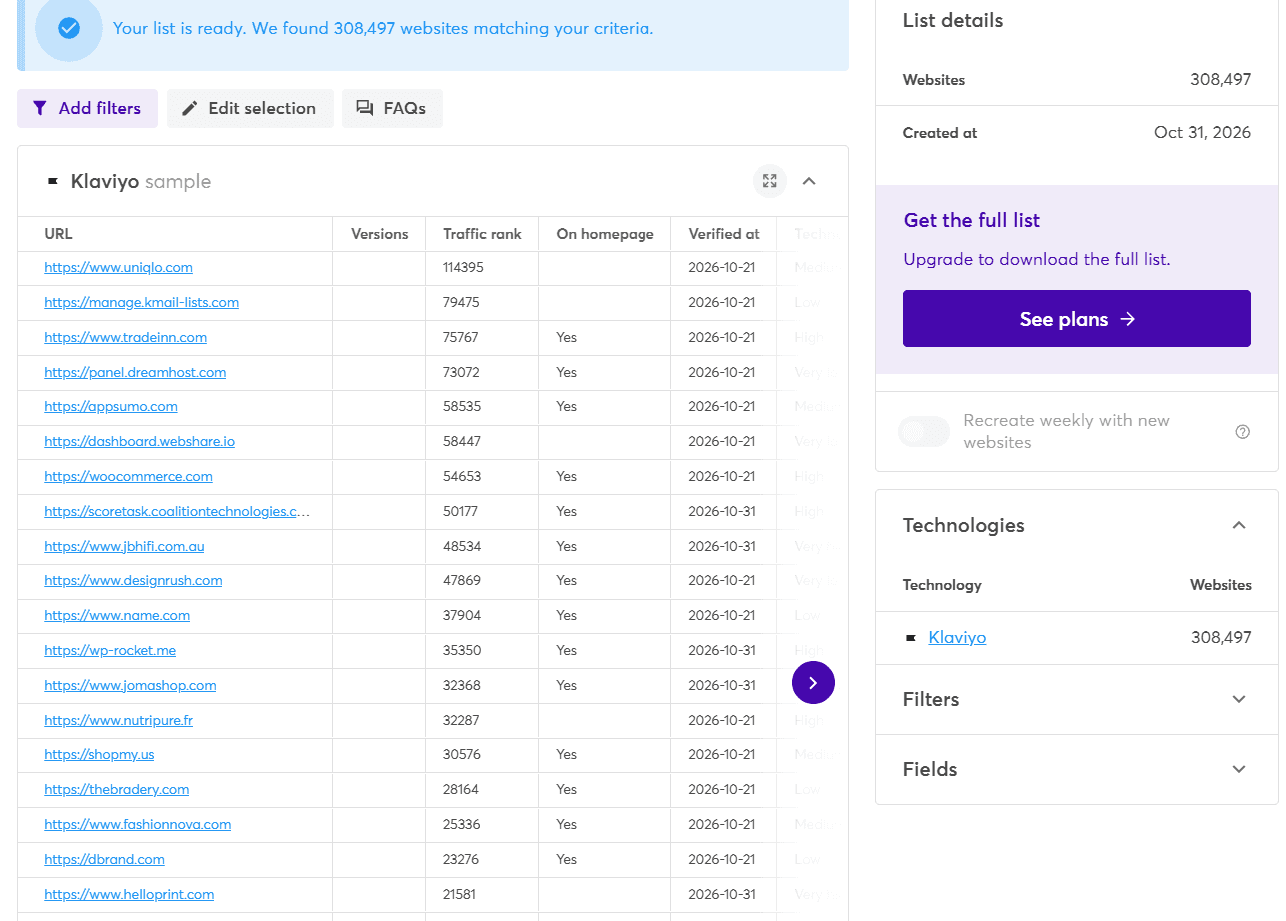
Next I tried the lead list builder with Klaviyo. It found 308,497 websites, and the free account gives you a 20-row sample. Two filters jumped out: "Technology must be present on homepage" (so yes, it really does pick up tools from deeper pages) and a freshness filter that defaults to sites verified in the last 0-2 months.
But is the data actually right?
I spot-checked five stores from the list: Uniqlo, dbrand, Jomashop, Fashion Nova and NuPhy. I opened each site and checked whether it actually loads Klaviyo's scripts (by inspecting the Network Console). All five did. 5 out of 5, and every row had been re-verified within the last two weeks. So the technology detection itself is fairly solid.
The company data attached to each row is a different story. In the same 20-row sample:
- name.com (the domain registrar) was described as a French greentech company and filed under "Hotels and Motels"
- DreamHost's control panel was filed under "Plumbing, Heating, Air-Conditioning" with an Australian address
- Klaviyo's own domain showed up as a 2-10 person "outpatient clinic"
- Uniqlo was listed at 201-500 employees
So the "which website runs Klaviyo" part is accurate. The "who is this company" part needs a second look before it goes into your CRM. On the upside, a lot of rows come with named decision-makers, emails and phone numbers, which Bloomberry doesn't do at all.
Can it see backend tools?
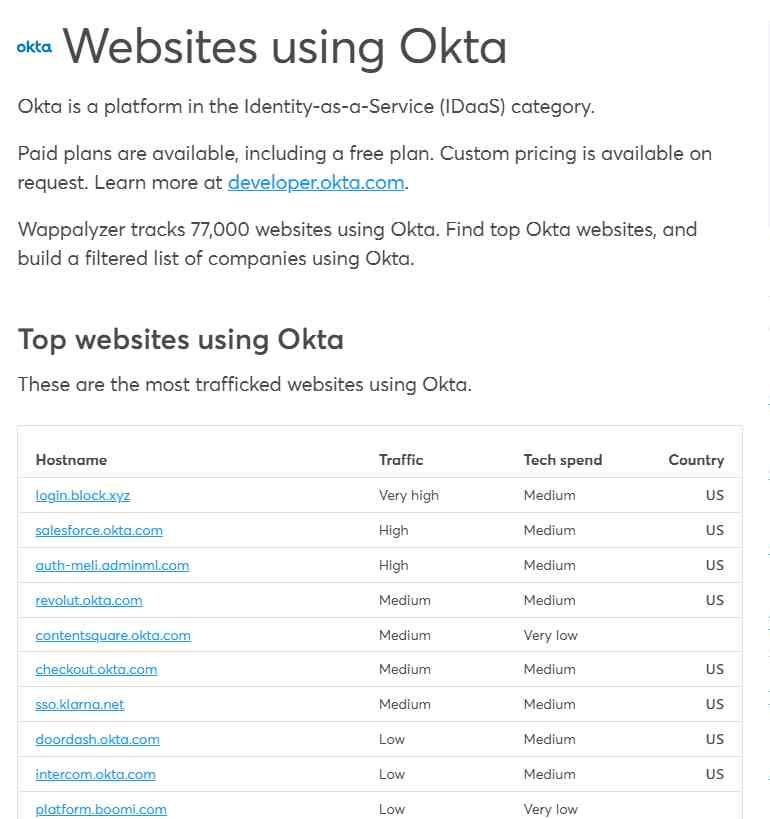
Sort of, and this one surprised me. Wappalyzer says it tracks 77,000 websites using Okta. But look at the list: it's mostly Okta login pages, like salesforce.okta.com and revolut.okta.com, that extension users happened to visit.
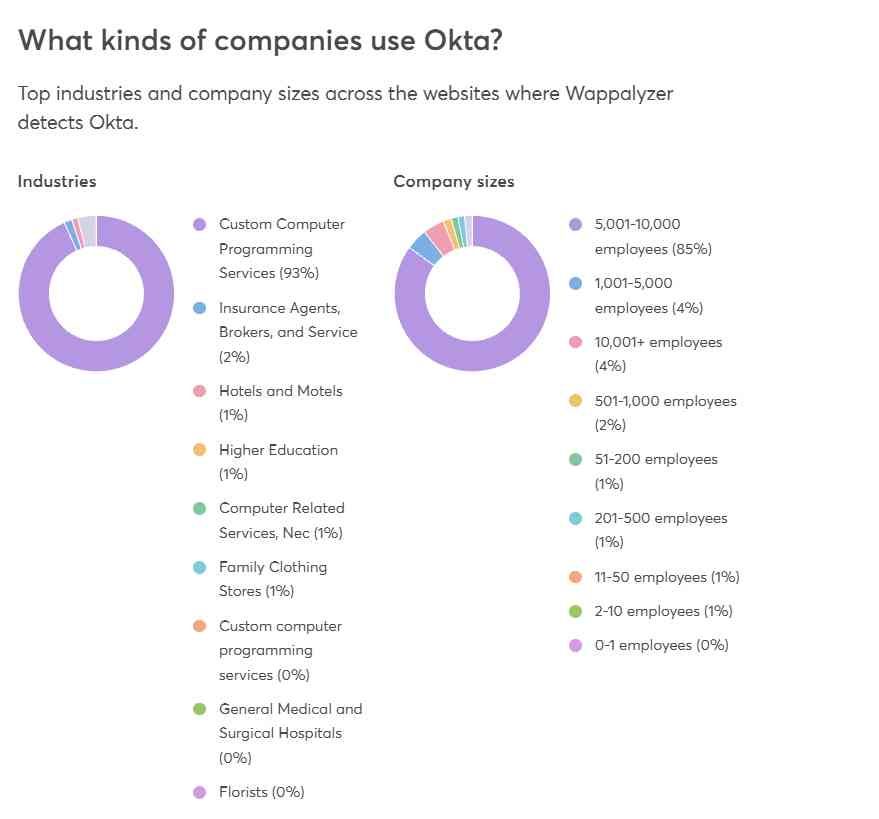
The catch is how it labels them. 93% are tagged as "Custom Computer Programming Services" and 85% as "5,001-10,000 employees." That's Okta's own profile (they have roughly 6,000 employees). Revolut is even tagged as a US company. So it seems to be matching every *.okta.com page to Okta the company, not to Salesforce or Revolut. If you export that list, a lot of rows are going to say "Okta." Which is clearly wrong.
Where it falls short
For tools that leave no trace in the browser, like NetSuite or most HR and finance software, Wappalyzer has nothing to go on. And even when it does catch a backend tool through a login page, you have to clean up the company matching yourself.
Pricing is the other thing. The $250/month Pro plan only lets you build lists for one technology. If you want to target more than one, you're looking at $450/month for Business.
Strengths:
- Detects technologies on checkout and deep pages that crawlers miss
- Technology detection held up in my spot-check (5 for 5)
- "Verified at" date on every row, re-checked roughly monthly
- Contact names, emails and phone numbers included in lists
- Free sample list before you buy
Limitations:
- Little to no visibility into backend tools that never load in a browser
- Company matching can be badly wrong (wrong industries, sizes, even wrong companies)
- Backend tools seen via login pages get attributed to the vendor, not the customer
- Coverage depends on where its extension users happen to browse
- Pro plan only covers one technology for list building
Pricing: Free (50 lookups/month, sample lists); Plus $10/month (company and contact info in lookups); Pro $250/month (one list technology); Business $450/month; Enterprise from $850/month
3. Store Leads - Ecommerce Store and App Data
Best for: Agencies, Shopify app developers and SaaS teams selling to ecommerce brands.
Store Leads unlike the other tools in this list, only does ecommerce, but it goes very deep. It tracks over 15 million store domains across Shopify, WooCommerce, Wix, BigCommerce and more, plus around 51,000 apps from the different app stores.
Testing it out
The free plan lets you poke around a surprising amount, so I went straight to the feature people underuse: app install data.
I searched the Apps tab for Klaviyo. Its Shopify app page shows 457,449 installs, 27,368 new ones in the last 30 days, and a 14% penetration rate across Shopify stores. That's a pretty good read on how fast a tool is growing, before you even look at a single store.
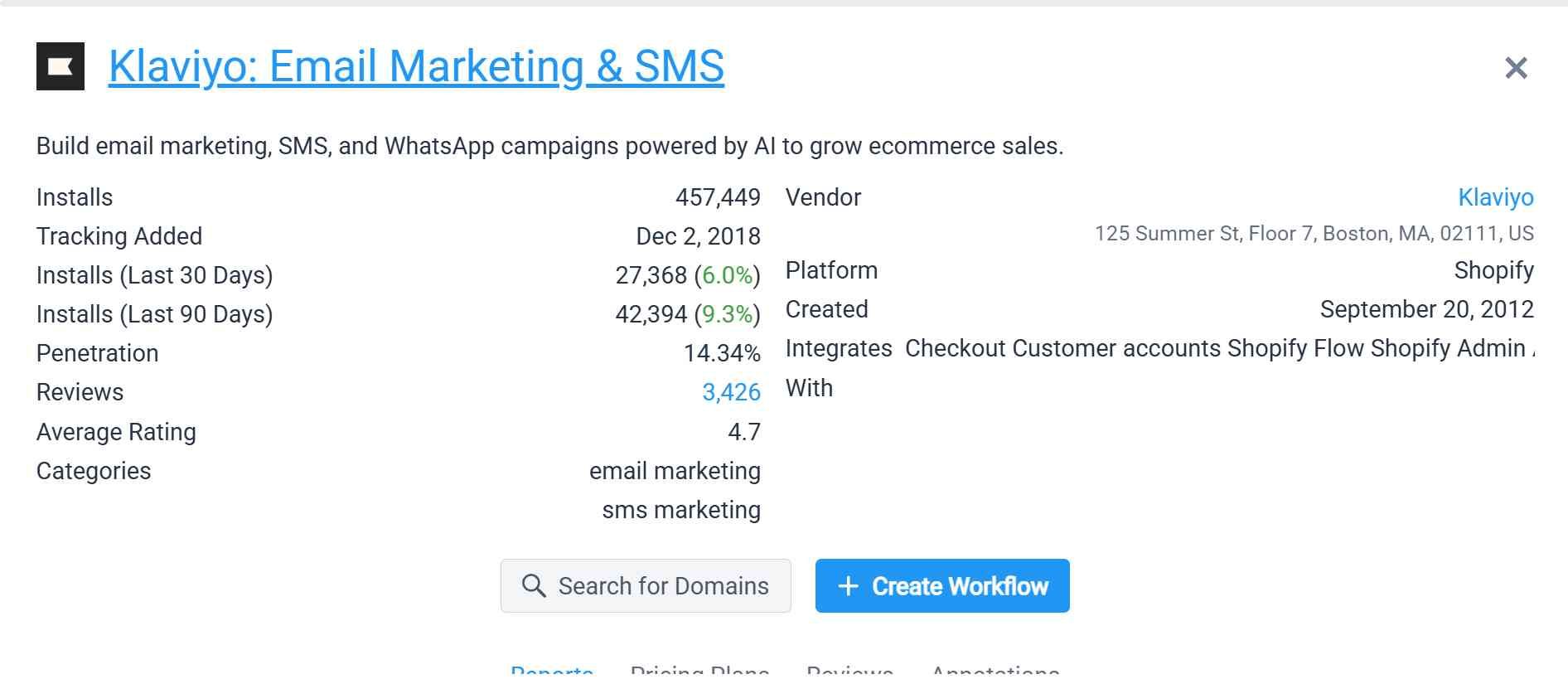
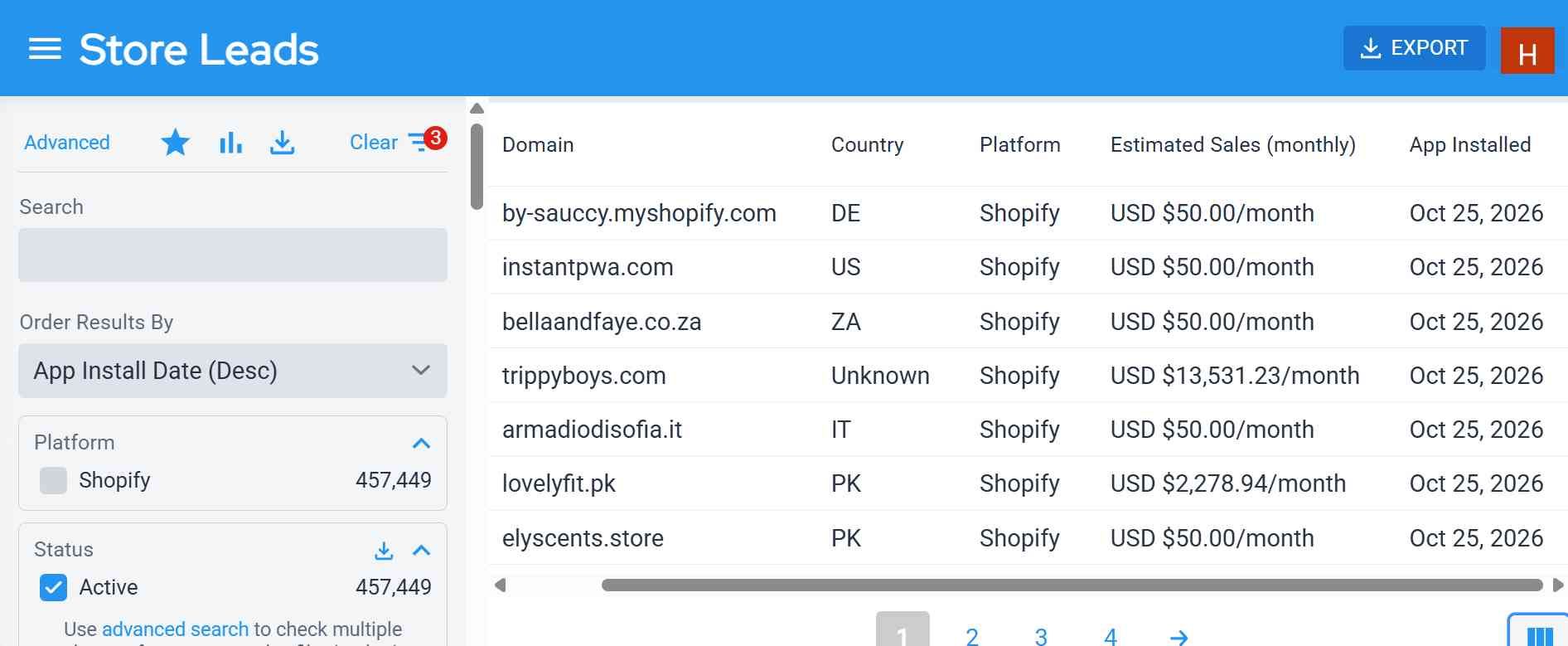
One click on "Search for Domains" gave me every store with Klaviyo installed. Then I sorted by "App Install Date," and the newest installs were from October 25, six days before I ran this. I presume StoreLeads updates its data weekly, but you might want to ask to make sure. But if you build a Klaviyo competitor (or a Klaviyo agency), that's basically a list of stores in your ICP.
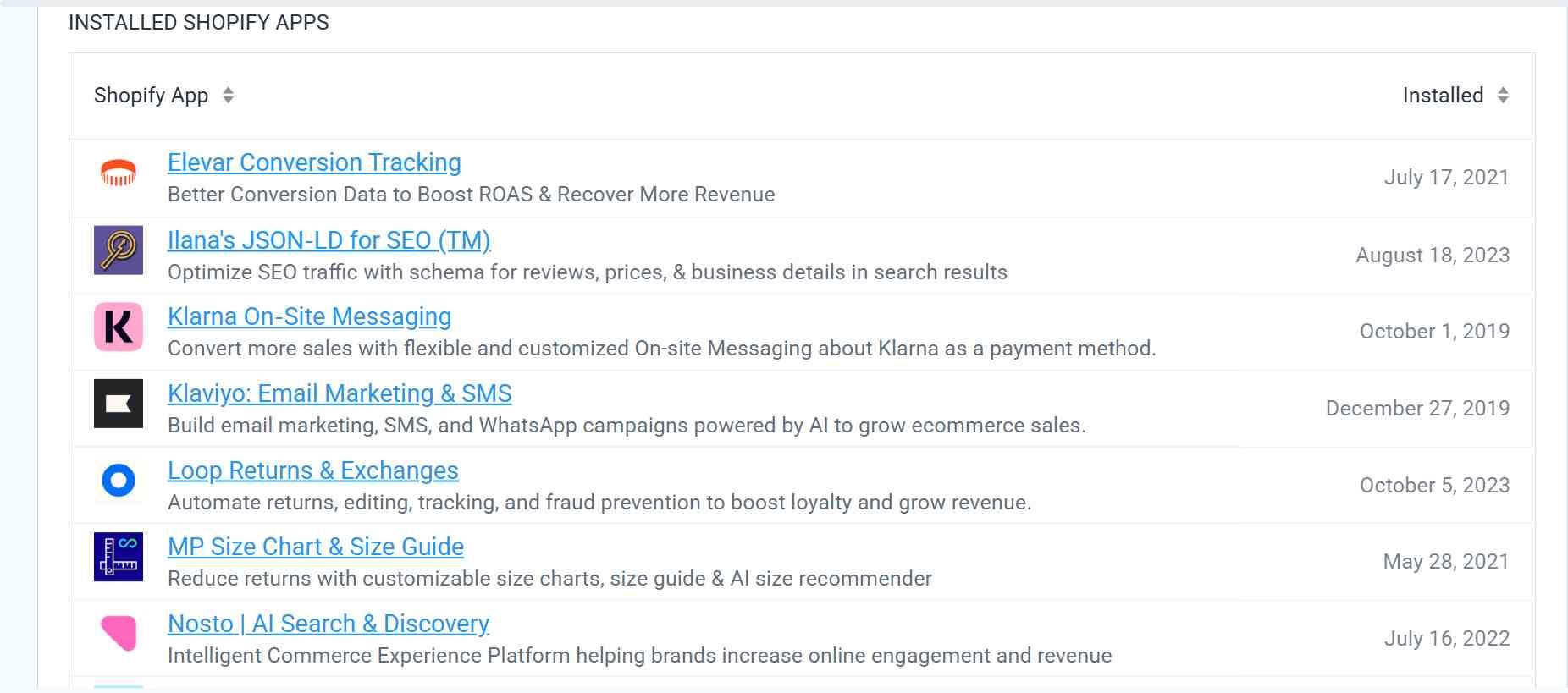
Clicking into a store gives you the full profile. For "Fear of God", it showed their myshopify domain, 981 products, 239 countries shipped to, and every installed app with the date it was added.
But is the data actually right?
I checked Fear of God's app list against their live site. Klaviyo, Elevar, Signifyd, Route, the size chart app, Nosto and Klarna all showed up in the code (the last two only on product pages, not the homepage), and Loop Returns runs their returns portal at fearofgod.loopreturns.com. That's 8 of the 10 listed apps confirmed. I couldn't verify the other two.
I also checked the Klaviyo list itself. The platform was right every time: every store I could check was on Shopify, including a couple of headless setups. Klaviyo was harder to confirm:
- Big stores: Fear of God and SKIMS clearly load Klaviyo. Steve Madden and Owala have Klaviyo references in their code, but the script didn't load. Timex showed nothing.
- Brand-new installs: Of the October 25 installs, Trippyboys had Klaviyo running. LovelyFit and Ely Scents were Shopify stores, but Klaviyo wasn't live on the site yet. And instantpwa.com turned out to be an app developer's own website, not a real merchant.
To be fair, that's less damning than it sounds. Klaviyo's Shopify app syncs orders and customers in the background, so a store can be a paying customer without loading anything on the storefront. And someone who installed it six days ago may just not have switched it on yet. But it does mean "installed" isn't the same as "actively using."
Where it falls short
StoreLeads is ecommerce only. If your buyer isn't an online store, there's nothing here for you.
The estimated sales numbers are also just that: estimates (there's absolutely no way they can get actual revenue). A lot of small stores showed exactly $50/month, which looks like a floor rather than a real estimate, so I wouldn't lean on it for anything important.
And like I mentioned, it maps stores, not people. It'll tell you a Shopify store runs Klaviyo and when they installed it, but not who to email. For that, you'll need to either scrape the emails yourself (Protip: Klaviyo configuration scripts often show the email of the store owner), or rely on a service like Apollo.
Strengths:
- Deepest ecommerce store coverage available
- App install dates, so you can sort by who installed something recently
- App-level trend data (installs in the last 30 and 90 days)
- Platform detection was accurate in every store I checked
- Weekly data refresh
- Chrome extension and CRM integrations
Limitations:
- Ecommerce only
- "Installed" doesn't always mean "actively using," especially for brand-new installs
- Estimated sales figures are rough, with lots of small stores sitting at the same placeholder value
- No verified contact data for decision-makers
- Premium plan only covers 2 ecommerce platforms; CSV export and API need the $250/month plan
Pricing: Free plan to explore; Premium $75/month (2 platforms, 2,000 searches); Pro $250/month (adds CSV export, API and unlimited searches); Elite $450/month (all platforms); Enterprise $950/month
4. TechPeeker - best for lead generation based on CMS and frameworks
Best for: Agencies and sales teams who need CMS, framework and WordPress data without BuiltWith or Wappalyzer pricing.
TechPeeker covers about 17.5 million websites and 800+ technologies. It's frontend-focused like Wappalyzer, but a lot cheaper, and it has a few filters that other tools lack.
Testing it out
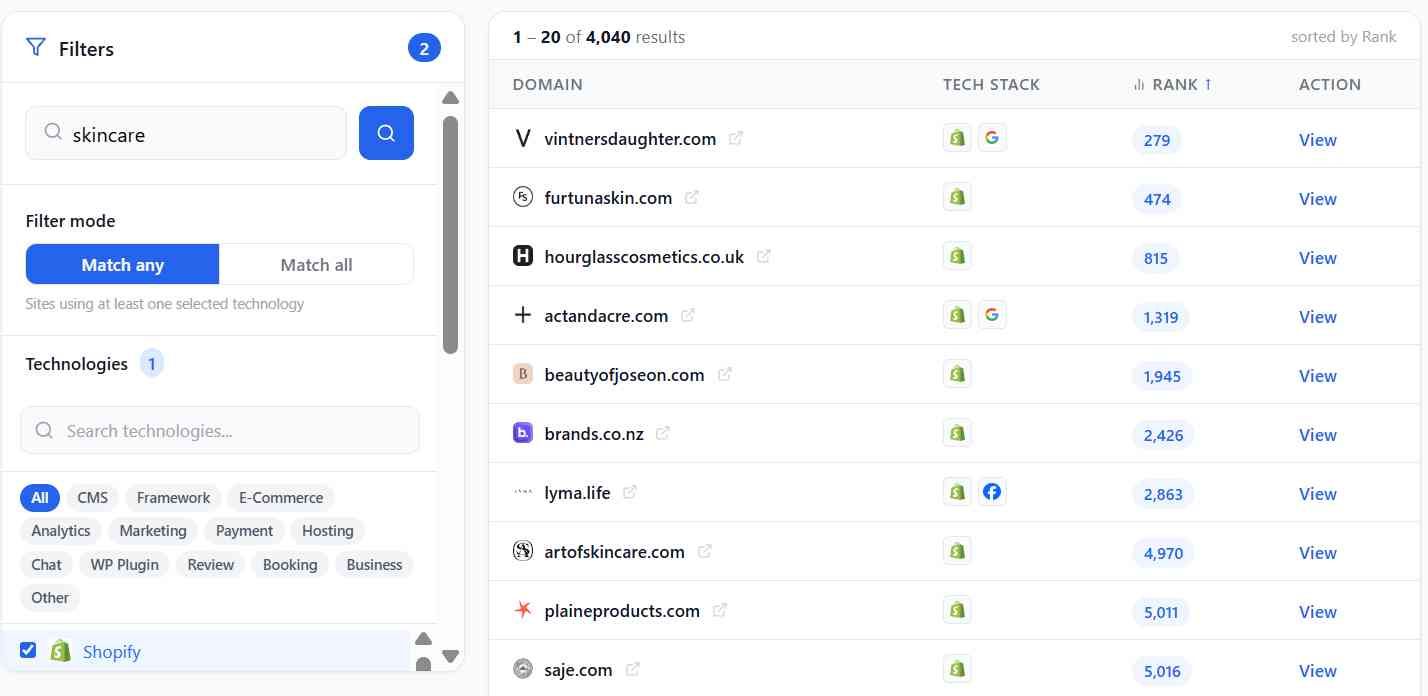
The dashboard is rather simple to use. You pick the technologies you're interested in on the left, add filters, get a list. I started with the example I'd heard about: Shopify stores with the keyword "skincare."
TechPeeker returned 4,040 sites, and they were all genuinely skincare brands: Vintner's Daughter, Hourglass Cosmetics, Beauty of Joseon, LYMA, Saje, Krave Beauty. It seems to searche each site's title + description for the term "skincare" (the exact phrase). I don't think they do any semantic searching though.
Next I tried searching for sites that use Ruby on Rails, filtered to German-language sites. TechPeeker showed me 13,052 Rails sites in total, 558 in German, and it took two clicks.
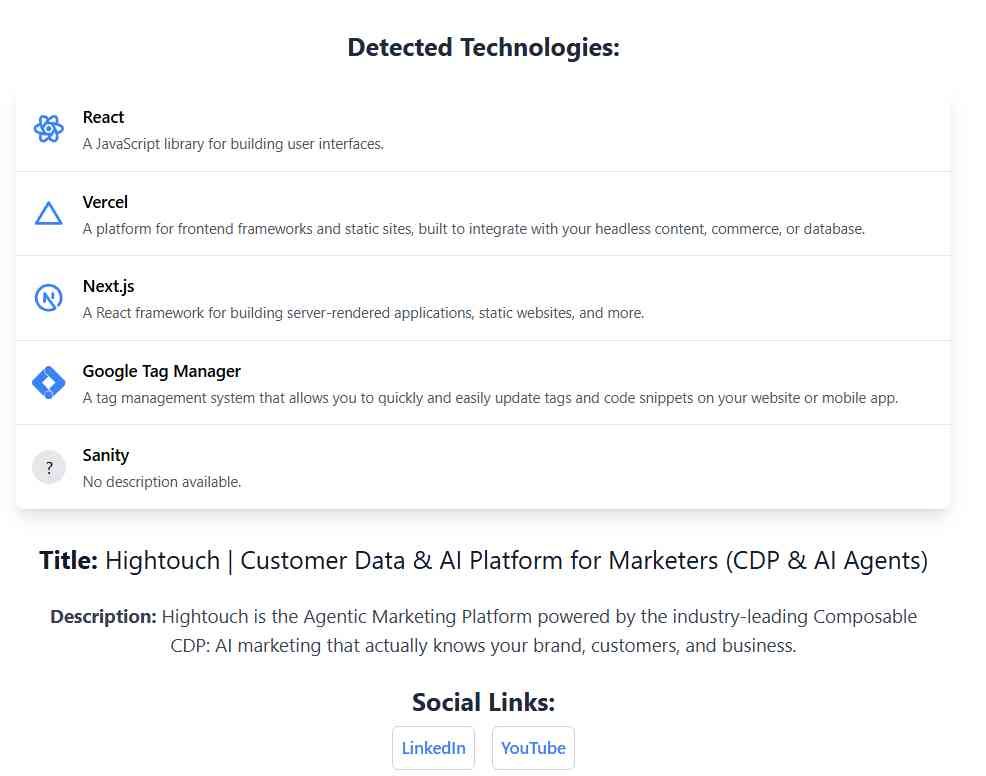
Then I ran hightouch.com through the Website Lookup, same as I did with the other tools. It scanned the site live and came back with React, Vercel, Next.js, Google Tag Manager and Sanity. That's two more than Wappalyzer found, including Sanity, which Wappalyzer missed.
But is the data actually right?
I opened five of the German Rails sites and looked for Rails' telltale signs in the page code. Pictrs, gut-erklaert.de and Kindaling all had them (based on their response headers), and Aquamaniac runs Redmine (a Rails app). The fifth, Modehaus, is a custom build where I couldn't tell either way. So 4 out of 5 confirmed, none wrong.
I also checked the full tech list for Vintner's Daughter, the top skincare result. TechPeeker listed 11 technologies, and 9 showed up on the live site (Shopify, Shop Pay, Google Tag Manager, Bing Ads, Crazy Egg, Gorgias, Reviews.io, reCAPTCHA, hCaptcha). But it missed Klaviyo, which the site clearly loads, even though Klaviyo is one of the technologies TechPeeker tracks.
Where it falls short
Coverage is the big one. TechPeeker has 273,001 Shopify sites. Store Leads has over 4 million. So that 4,040-site skincare list is a nice starting point, but it's nowhere near every skincare brand on Shopify. If your priority is getting the biggest coverage, TechPeeker may not be for you.
Second, I found the default "Rank" sort is odd. With no filters, google.com shows up twice at around rank 101, behind a bunch of tiny sites, so I wouldn't use it to judge how big a site is.
On the plus side, TechPeeker also ships several free tools: a Shopify theme detector, WordPress theme detector, CMS detector and Shopify app detector, all usable without an account for one-off lookups.
Strengths:
- Much cheaper than BuiltWith or Wappalyzer for frontend data
- Keyword filtering on title and meta description
- Framework detection held up in my spot-check (4 confirmed out of 5, none wrong)
- Live website lookups that found more than Wappalyzer on the same site
- Free standalone detector tools
- Bulk lookup and API on the Business plan
Limitations:
- Much smaller Shopify coverage than Store Leads (273K vs 4M+)
- Thin per-site data, with little company or contact info
- Missed some well-known tools (like Klaviyo) on sites it did scan
- Weak backend detection, public-facing web technologies only
- The "Rank" sort isn't reliable
Pricing: Starter $99/month; Business $149/month adds bulk lookup and API access (25k requests/month). Both are about 17% cheaper billed yearly.
5. JobsPipe - Technographics From Job Postings
Best for: Teams who need backend and back-office software that leaves no website footprint, and developers building technographic data into their own product.
JobsPipe is rather unique in that it doesn't look at websites at all (well, mostly). Instead, its pulls job postings from 30+ sources, including LinkedIn and a long list of ATS systems (ie Workday), and lets you search for companies that mention a technology in their job descriptions.
Because of this JobsPipe helps you find which ERP or HR platform a company runs.
Testing it out
To test it out, I decided to search for NetSuite, which is basically invisible on a website, filtered to US-based companies. It came back with 17,862 job postings, all posted that same day.
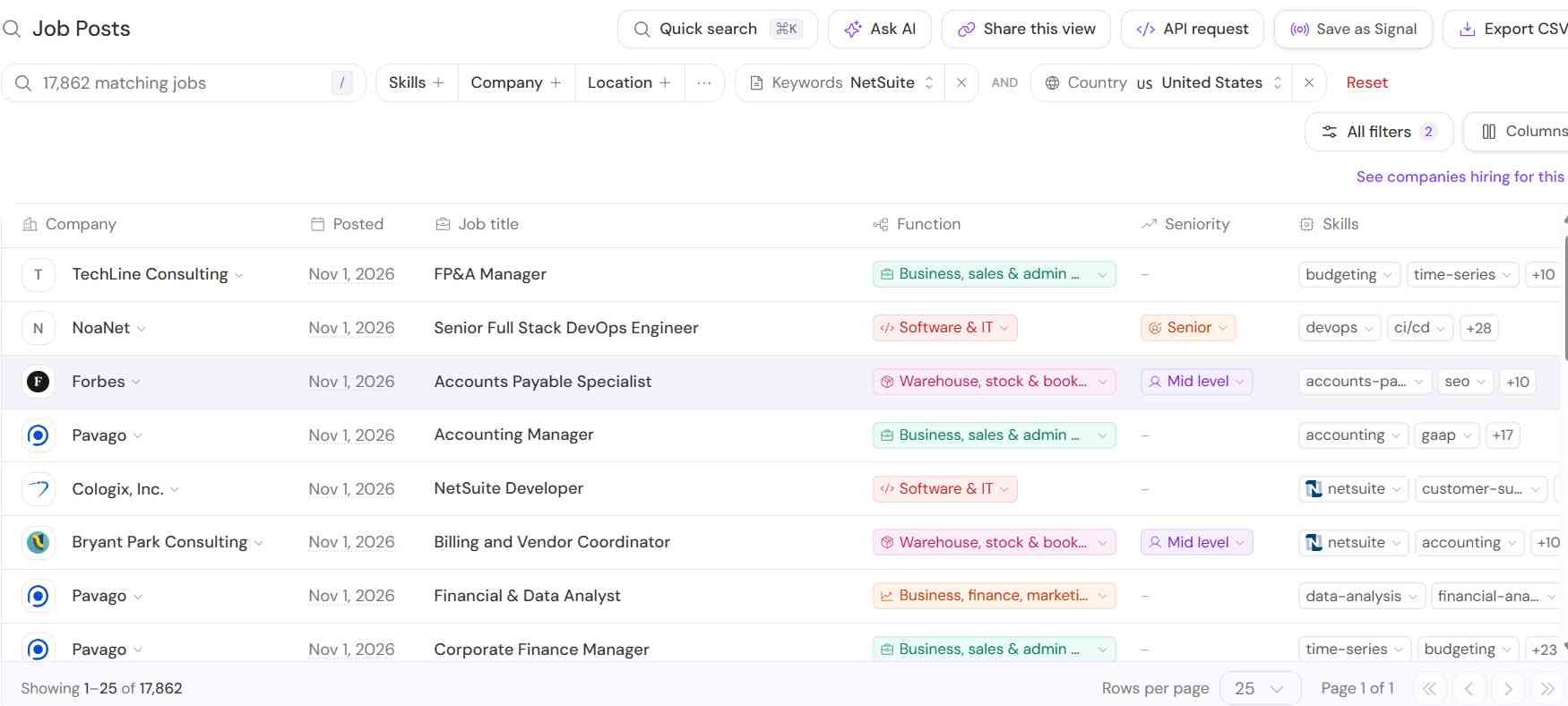
Pricing is pay-per-use: each job you pull costs 1 credit, so that first page of 25 results cost 25 credits out of my 1,000 free ones. Click into a posting and you get the technologies pulled out of the description, sorted into "Required," "Preferred" and "Mentioned" with a confidence level, plus dates for when it was posted, last seen and verified.
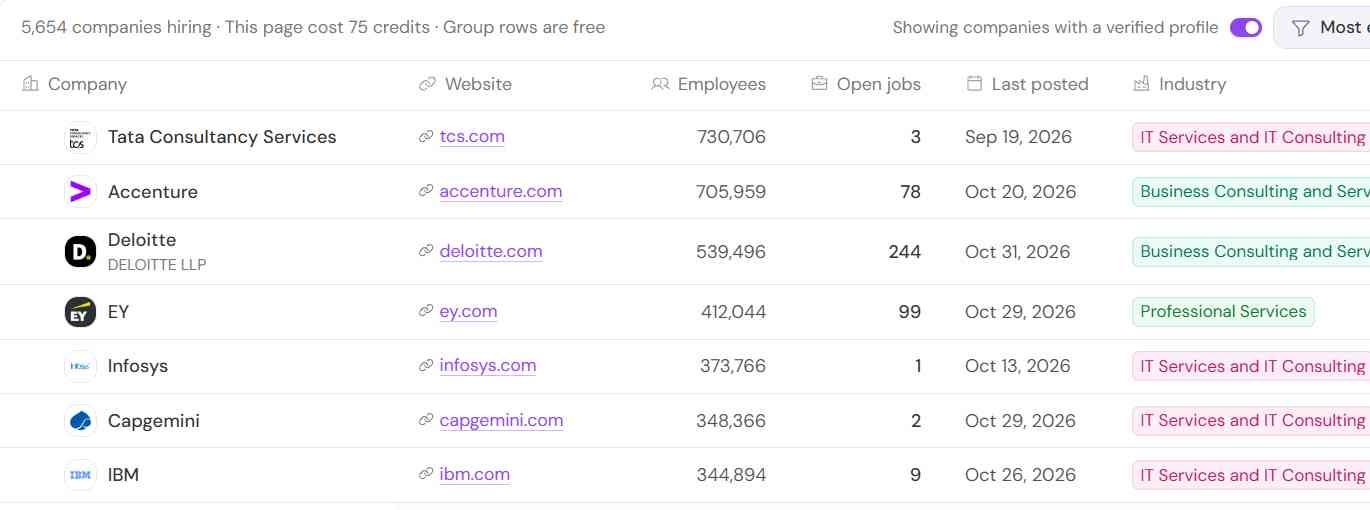
Next, I clicked "See companies hiring for this," which rolls the postings up into companies: 5,654 of them. (That page cost 75 credits, so watch your balance.)
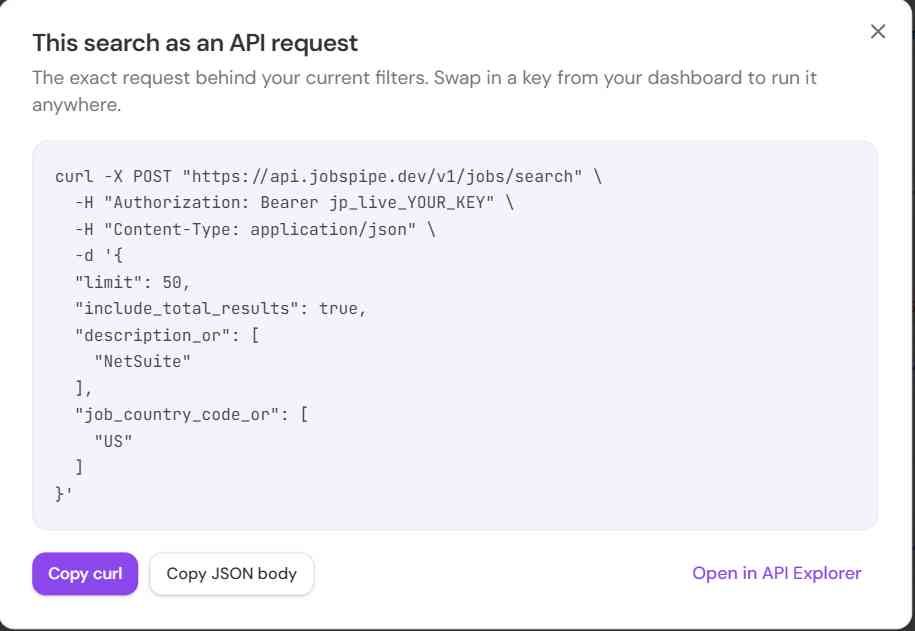
The nice touch for developers is the "API request" button. Build your search in the UI, click it, and it hands you the exact API call to drop into your code. There's also a REST API, SDKs and an MCP server you can point Claude at.
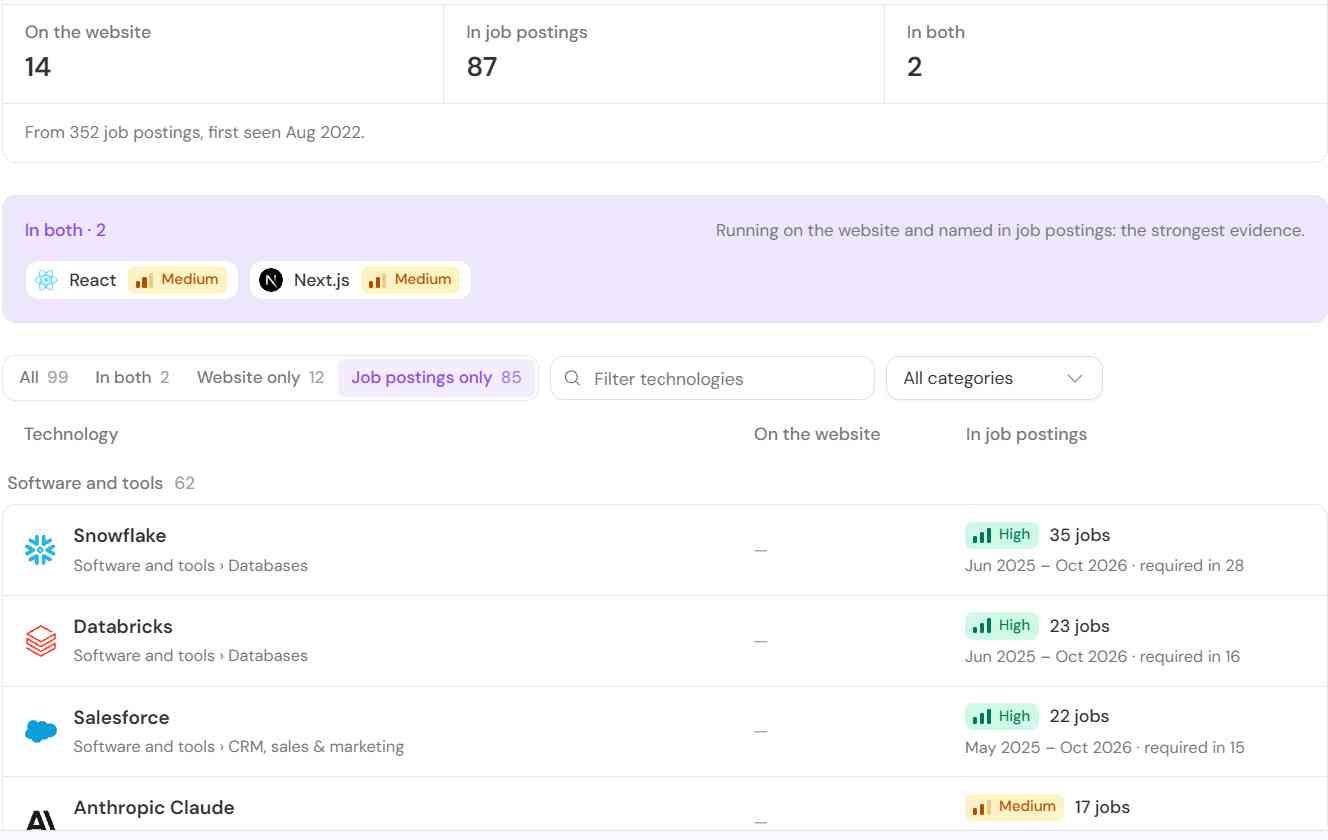
Last, I ran hightouch.com through the Tech Stack page, (the same test I did with the other tools). This used to be a website-only scan, but it now shows two signals side by side: 14 technologies on the website, and 87 named across 352 Hightouch job postings. That second list has things like Kandji and Jamf (laptop management), Rippling, Gong, Outreach, Okta and Slack, none of which you'd ever catch on their homepage.
But is the data actually right?
I opened five of the NetSuite postings and read the original descriptions to see if it was highly likely each company is using Netsuite.
-
Forbes: Real. The accounts payable role needs "working knowledge of NetSuite, including vendor bills" and their bank matching module. That's definitely a NetSuite customer.
-
NoaNet: Real. The DevOps engineer builds integrations between ServiceNow, NetSuite, Monday.com and their other internal systems. Bonus: you just learned three more tools they run.
-
Cologix: Real. They're hiring a NetSuite Developer.
-
Pavago: Not really. It's a staffing firm, and the posting says "one of our clients is hiring." The NetSuite signal belongs to someone you can't see. Pavago had three of the first eight rows.
-
TechLine Consulting: Same problem. "The company is hiring," and it only asks for "NetSuite or similar ERP experience."
So 3 of 5 pointed at a real NetSuite user. The other two were recruiters, and JobsPipe labeled both as a "Direct employer," which they aren't.
The extracted tags overreach a little, too. The Forbes posting got Coupa, BILL and SAP Concur tagged as "Required," but the description only lists them as examples of acceptable experience. And on the Hightouch lookup, a few of the 87 are tools Hightouch integrates with for customers (Braze, Iterable), not tools it runs.
Where it falls short
Most of this is inherent to job posting data rather than anything JobsPipe is doing wrong. A mention is a mention, and consultancies, staffing firms and SaaS companies all mention tools they don't actually run.
Whether that matters depends on what you're doing. If you're targeting companies that mention HubSpot because you want companies doing marketing automation, the mention is probably signal enough. But if you're selling HubSpot services to companies using HubSpot, you probably want to target actual customers of HubSpot instead.
The other limitation is timing. Companies tend to mention a technology in postings long after they adopted it, so this isn't the source for catching recent adopters. And it only covers companies that are actively hiring.
Strengths:
- Detects backend and back-office software that has no website footprint
- Pay per job pulled rather than per seat
- Tech tags split into required, preferred and mentioned, with confidence levels
- Tech Stack page compares website and job-posting signals side by side
- REST API, SDKs, an MCP server, and an "API request" button that turns UI filters into code
- 30+ posting sources normalized into one schema
Limitations:
- A mention in a posting is not proof of use (3 of 5 in my check were real users)
- Staffing firms and consultancies show up as "Direct employers"
- Postings lag adoption, so it's poor for catching new adopters
- Only covers companies that are actively hiring
- Credits go fast in the UI (the companies view cost 75 credits a page)
Pricing: Free tier with 1,000 credits. Builder $49/month (25,000 credits), Growth $149/month (100,000), Scale $399/month (300,000), Business $650/month (500,000). One credit equals one job returned, and adding technologies to a job costs +1 credit. About 20% off billed yearly.
6. Hunter TechLookup - Free Tech Lookup Pages
Best for: Getting a quick, free feel for who uses a tool before you pay for anything.
Hunter is best known as an email finder. TechLookup is their lesser known technographics add-on: a free public page for each of 1,581 technologies, with how many sites run it, a sample of those sites, and which tools show up alongside it.
Testing it out
To test it out, I decided to look up Klaviyo. Hunter says it detects it on 42,996 websites, updated the day I checked. For comparison, Wappalyzer reported about 308,000 and Store Leads about 457,000 installs. So Hunter's coverage is a lot thinner.
The page gives you a sample of sites "ordered by web popularity," plus industry and how many email addresses Hunter has for each domain. It's a nice way to funnel users into their flagship email finder product.
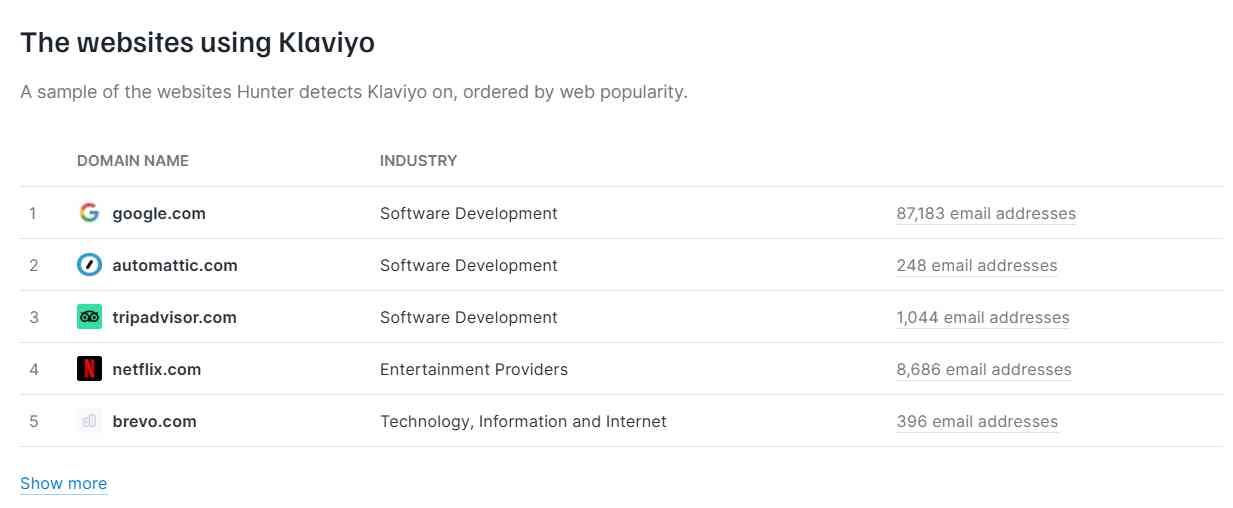
But that's where it got weird. The #1 site using Klaviyo is... google.com? Seems kind of suspicious.
What I also couldn't do is turn this into a real list. There's no export button on the TechLookup page. The place you'd actually filter companies by technology is Hunter's Discover tool, and on the free plan the Technologies filter is locked behind an upgrade.
But is the data actually right?
I checked the top 5 "most popular" Klaviyo sites. None of them run Klaviyo:
- google.com - obviously not.
- automattic.com - no Klaviyo script.
- tripadvisor.com - no Klaviyo script.
- netflix.com - no Klaviyo script.
- brevo.com - the only mention of Klaviyo is a "Brevo vs Klaviyo" comparison link in their nav. Brevo is a Klaviyo competitor, so that's a pure word-match false positive.
To be fair, when I scrolled down to actual ecommerce brands in the sample, it did better. Society6, Glossier and AllSaints all had Klaviyo loading. SteelSeries didn't.
So my take: the sample is ordered so the biggest logos float to the top, and those are exactly the ones it gets wrong. Hunter's own FAQ also says to treat a detection "as a strong lead to check rather than a confirmed customer."
Where it falls short
- No list export from TechLookup. It's a set of browsable pages, not a list builder.
- Tech filtering costs money. The Technologies filter in Discover needs a paid plan.
- Smaller coverage. ~43K Klaviyo sites vs 300K+ elsewhere.
- False positives at the top. 0 for 5 on the most visible results.
Strengths:
- Free, no login needed to browse
- Email counts per domain, so you know if a list is actually reachable
- "Commonly used alongside" data is handy for spotting adjacent tools
Limitations:
- Can't export from TechLookup; tech filter is paywalled in Discover
- Much smaller coverage than the other tools here
- Noisy detection on big, popular sites
Pricing: TechLookup pages are free. Hunter's free plan includes 50 credits/month and basic Discover filters. The Technologies filter needs a paid plan, starting with Starter at $34/month billed yearly ($49 monthly).
7. NerdyData - Search Any Snippet of Code
Best for: Finding sites that use niche tools no technology database tracks yet, or anything you can identify by a line of code.
NerdyData is a cool tool I found from Hacker News years ago. It's basically a search engine for website source code. It has crawled about 14.7 million domains and tracks 1,131 technologies, but the part that makes it rather unique is its code search. You can type in any snippet of HTML, JavaScript, CSS, a cookie name or an HTTP header, and it finds every site in its index that has it. It also fully renders pages, so scripts loaded through tag managers show up too.
That matters when the tool you care about is too new or too niche for anyone's technology list. If you can find one line of code it always leaves behind, you can find its customers.
Testing it out
As an example, I searched for j.northbeam.io, the script domain for Northbeam, a marketing attribution tool. It came back with 201 websites, each with an estimated tech spend, page rank and when it was last crawled.
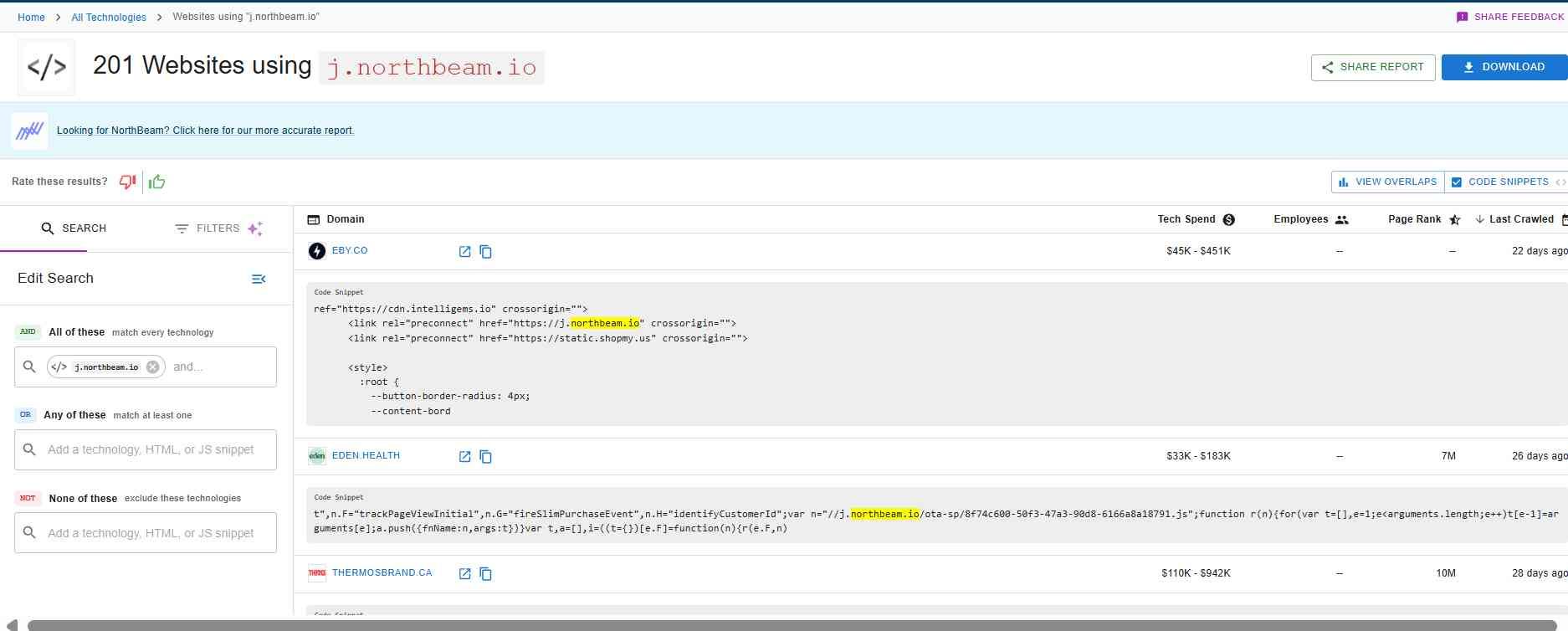
The best part: every result shows the exact snippet where the match was found, highlighted. So you can see why a site is on the list without opening it. You can also stack conditions with AND, OR and NOT (say, sites with Northbeam AND Shopify but NOT Triple Whale).
NerdyData also pointed me to its dedicated Northbeam report, which it calls "more accurate." That one had 258 sites, so the raw code search is a decent first pass but not the whole picture.
But is the data actually right?
I opened five sites from the list:
- EBY: Yes, Northbeam loads.
- Stan: Yes, Northbeam loads.
- Qure Skincare: Yes. Northbeam is in the page code, though it hadn't fired yet when I loaded the page.
- Thermos Canada: No sign of it anymore.
- Eden: Couldn't tell. They route their tracking through their own subdomain, which hides it.
So 3 of 5 confirmed, 1 looks gone, and 1 I couldn't check. The "gone" one isn't too surprising: the freshest results had been crawled 22 to 31 days earlier, so the data is roughly a month old. So not real-time.
Two other things to watch for. A match on a snippet isn't always the real script. The top result's highlighted snippet was just a "preconnect" hint to Northbeam's domain (the script did turn out to be there, but a hint alone wouldn't prove it). And coverage has gaps. dbrand loads Northbeam on every page, and it wasn't in either list.
Where it falls short
Coverage is noticeably smaller than the big players. NerdyData counts about 194,000 Shopify stores, while Store Leads has over 4 million. And with roughly monthly crawls, it won't catch anything that changed in the last few weeks.
It's also frontend-only, like Wappalyzer and TechPeeker. If a tool never leaves a trace in a website's code, code search can't find it.
Strengths:
- Search any HTML, JavaScript, CSS, cookie or header, not just known technologies
- Shows the matching code snippet for every result
- AND / OR / NOT searches to build very specific lists
- Renders pages fully, so tag-manager scripts are included
- Tech spend and filters by country, industry and date added or removed
- Cheap on annual billing
Limitations:
- Smaller index than BuiltWith or Store Leads (about 14.7M domains)
- Data is roughly a month old
- A snippet match isn't always proof the tool is running
- Frontend only, no backend detection
- Downloads need a paid plan
Pricing: Basic $200/month or $600/year (5,000 rows per download); Pro $300/month or $900/year (200,000 rows per download); Enterprise custom. The API is pay-as-you-go and not included in the plans.
8. WhatRuns - Free Alternative
Best for: Freelancers, solo operators and casual researchers.
WhatRuns is a completely free browser extension. And by completely free, I mean completely free. No account, no credits, no paywall. You visit a site, click the icon, and it shows you what it thinks the site runs.
Testing it out
I installed it and ran it on dbrand.com, a store whose stack I'd already checked by hand while testing the other tools. It came back with 12 technologies, neatly grouped: Facebook, Varnish, Vercel, Google Tag Manager, Adobe Launch, Upfluence, HSTS, Vue JS, PHP 8.2.18, Postscript, Svelte and Pandectes.
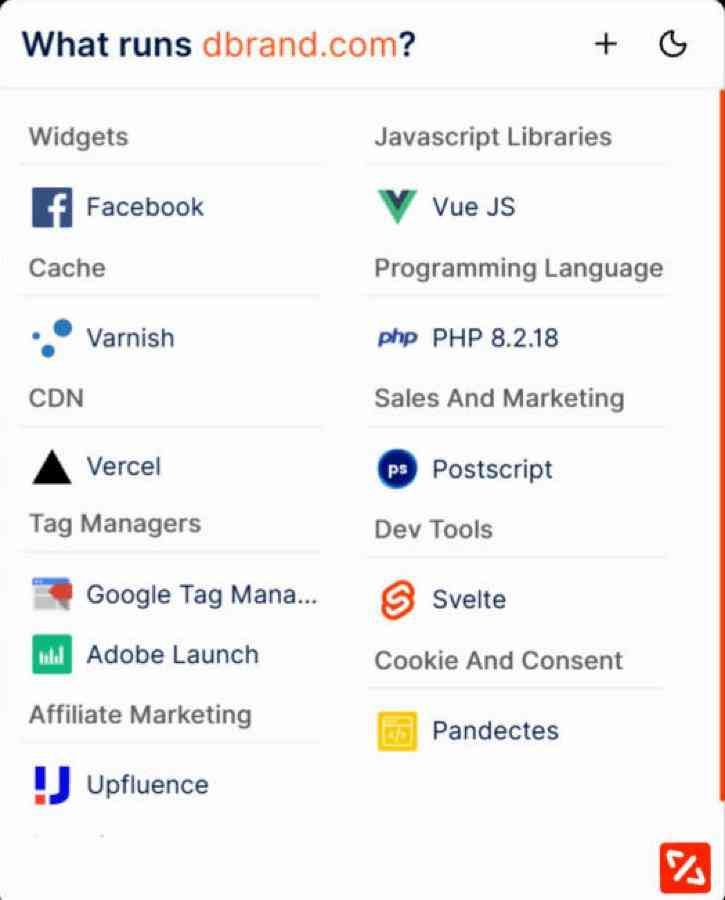
That looks like a decent list at first glance. Then I checked it against the live site.
But is the data actually right?
Some of it, yes. Vercel, Svelte, Postscript, Facebook and Google Tag Manager all showed up in the page code.
But the misses are the interesting part. dbrand is a headless Shopify store (a Svelte front end on Vercel, pulling from Shopify's API), and WhatRuns didn't show Shopify at all. It also missed Klaviyo, which loads on every page, plus Northbeam, Superfiliate, Sanity and Reddit's ad pixel.
And a few things on the list don't seem to be there anymore. I couldn't find any trace of Vue, Adobe Launch, Upfluence or Pandectes on the page, and "PHP 8.2.18" is an odd thing to see on a Svelte site hosted on Vercel. Pandectes is a Shopify cookie-consent app and Upfluence is an affiliate tool, and the site now loads Superfiliate instead. My guess is some of these are leftovers from an older version of the site.
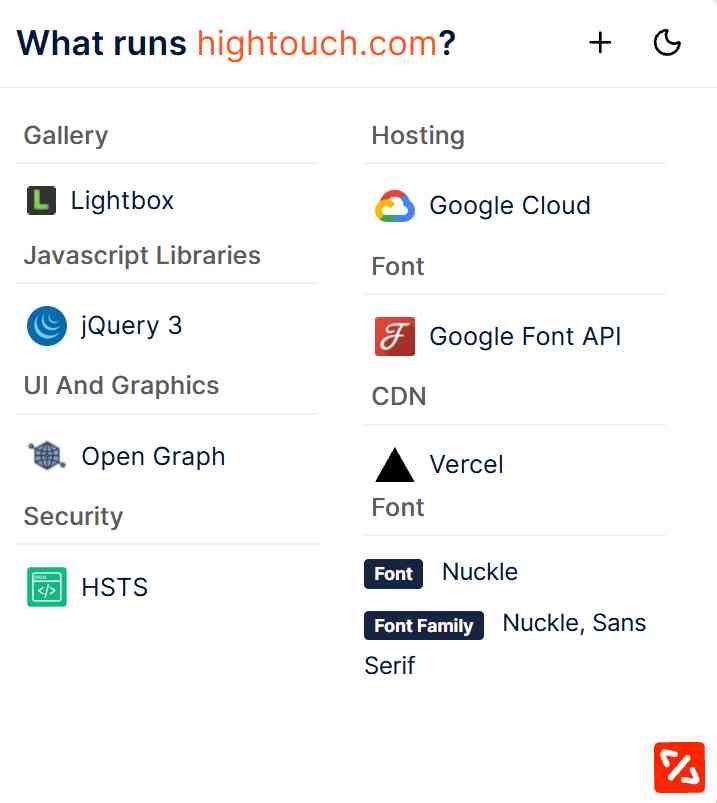
Then I ran it on hightouch.com, the site I'd looked up with every other tool. The same discrepancies exist. It correctly spotted Vercel, Open Graph tags and the site's custom font (Nuckle, which is a nice catch). But it listed jQuery 3, Lightbox, Google Fonts and Google Cloud, none of which I could find on the page, and it missed Next.js, React and Sanity entirely. Wappalyzer and TechPeeker both caught Next.js and React on the same site.
The rest of WhatRuns feels a bit dated too. Its technology pages (like "Websites using Klaviyo") show about a dozen example sites, every one marked "Popularity: Low" and "Category: Unknown," even big brands like Specialized and Anker. The "related technologies" list includes Beeketing and Adobe Business Catalyst, both of which shut down years ago. And there's no way to pull a full list. WhatRuns' own FAQ says to install the extension and visit each site.
To be fair, the extension itself is still maintained (it was updated in April 2026), and it does pick up fonts, which most tools skip.
Where it falls short
It's a quick, free way to peek at a site, and that's about it. On both sites I tested, it missed the main platform and framework, while listing several things I couldn't find. So I'd use it as a starting point and double-check anything important.
Use it if you can't justify paying for anything else. Just don't expect much detail :)
Strengths:
- Completely free, no account needed
- Instant results from a toolbar click
- Detects custom fonts (and says it covers WordPress plugins too)
- Can follow sites and notify you when their tech changes
Limitations:
- Missed major tools in my tests (Shopify, Klaviyo, Next.js, React) and listed some that weren't there
- Struggles with modern headless setups
- No list building, individual lookups only
- Technology pages look stale (discontinued tools, every site marked "Low" popularity)
Pricing: Free
9. urlscan.io - Security Research
Best for: Security researchers, OSINT investigators, and anyone willing to dig for scripts and logins other tools miss.
urlscan.io is a security tool, not a sales tool. For those who aren't familiar with it, how it works is that people submit URLs (often suspicious ones). URLScan then loads each page in a sandbox browser and logs every script, domain and request the page makes. That includes deep pages like checkouts and login screens that a normal crawler never reaches. All the public scans are searchable, and that's where it gets useful for tech stack research.
Testing it out
Trick #1: find sites that load a specific script. I searched for domain:static.klaviyo.com, Klaviyo's script domain. It came back with 10,000+ scans, and the newest was from 20 seconds earlier. Any page that loaded Klaviyo in the scan shows up, whether it's a homepage, product page or checkout.
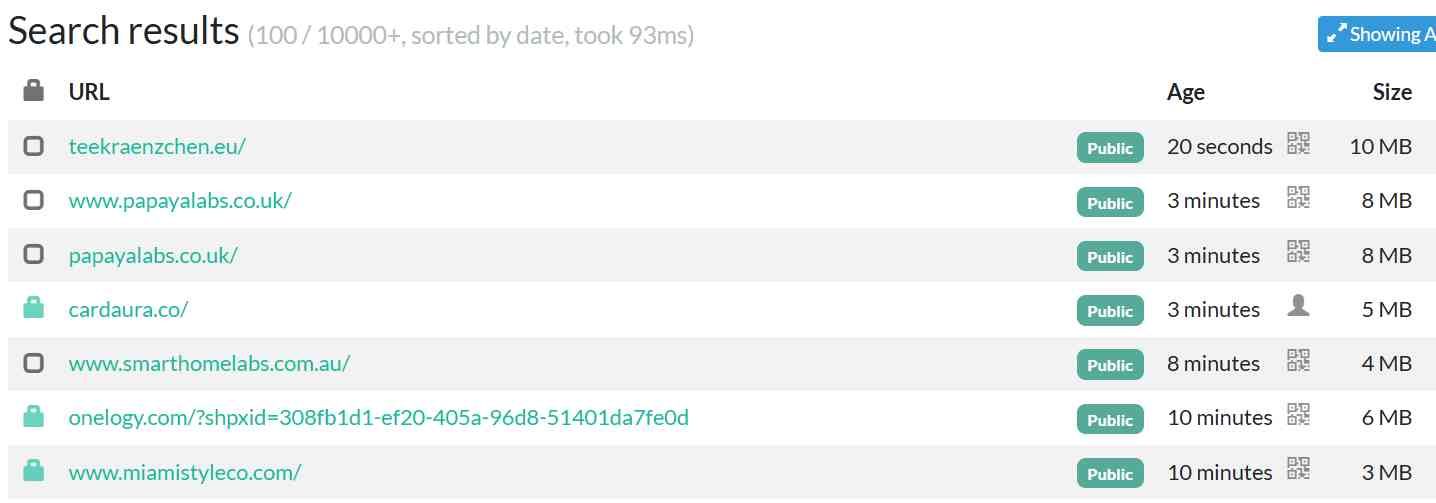
The catch: it's a list of scans, not companies. The same store shows up over and over (one had five scans within a few hours), so you'll need to dedupe before it's usable as a list.
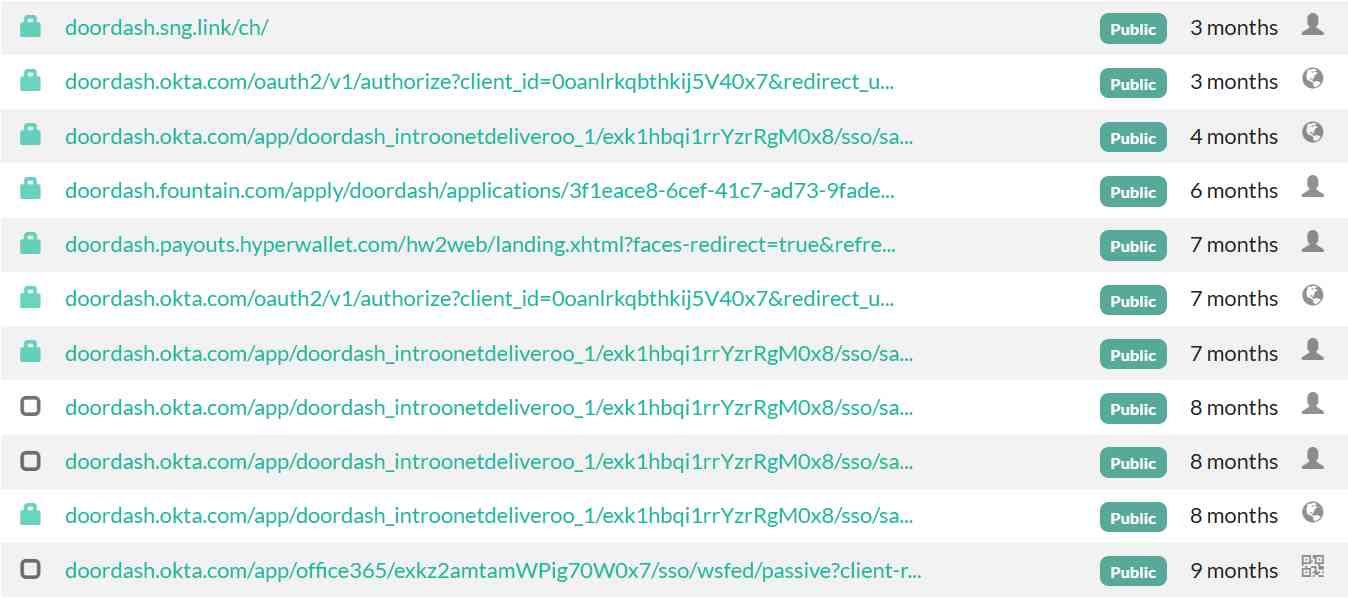
Trick #2: find a company's SaaS logins. A lot of SaaS tools give each customer their own subdomain, like companyname.okta.com. So I searched page.domain:doordash.*.*, which finds pages on any subdomain starting with "doordash."
It returned 66 scans. Among them: doordash.okta.com (their identity provider, with Office 365 and an app tied to their Deliveroo acquisition sitting behind it), doordash.fountain.com (Fountain, a hiring platform), doordash.payouts.hyperwallet.com (PayPal's payout service) and doordash.sng.link (Singular, for app attribution).
But is the data actually right?
Most of the technologies are pretty accurate, when I cross referenced them. DoorDash's own job postings say it uses "an automated recruitment tool called Fountain," and its help center says creator payouts go "through HyperWallet." Okta is about as safe a bet as it gets with two dozen scans of the login page.
But here's the thing you won't see with any other tool on this list: a lot of the other DoorDash results were phishing sites. Fake SSO pages, a misspelled "greehouse" domain, fake webmail gateways. That makes sense, because people submit suspicious links to urlscan precisely to check them. So you can't take a result at face value. You have to look at each domain and ask "is this really DoorDash's?"
I also tried it on a smaller company, Hightouch. Only two results came back, both for their DataGrail privacy portal (which Bloomberry also detected). For smaller companies, there just isn't much in there, because nobody's submitted their pages.
Where it falls short
URLScan recently made a change in how far back you can search. It's 30 days of history if you're not logged in, and 90 days with a free account. Anything older needs a paid plan. That matters a lot for the login-page trick, since those pages don't get scanned very often.
Beyond that, you only see what someone else happened to submit, so coverage is random. Results are full of duplicates and phishing lookalikes. And there's no company data, no contacts and no list export built for sales. You need to be comfortable with search syntax like page.domain: to get anything useful.
Strengths:
- Sees scripts on deep pages (checkouts, logins) that crawlers miss
- Very fresh data, with scans from seconds ago
- Can surface a company's SaaS logins by subdomain
- Full network request logging for every scan
- Free account with 1,000 searches a day
Limitations:
- Search history is limited (30 days without an account, 90 days with a free one)
- Coverage depends on what other people happened to submit
- Results include phishing lookalikes and lots of duplicates
- Steep learning curve, no sales-focused features or company data
Pricing: Free (1,000 searches/day). Commercial plans start at $5,000/year for API-only, and the urlscan Pro platform starts at $1,250/month.
10. Chrome DevTools + Claude - The DIY Option
Best for: Checking one company's stack properly, for free, when you don't trust (or can't afford) a database.
Every tool on this list is basically doing the same thing under the hood: loading a site and looking at what scripts it runs and what it calls out to. You can do that yourself in about 30 seconds with Chrome's developer console. Then hand the output to Claude (or ChatGPT) to make sense of it.
Testing it out
Here's how you can do this yourself. First, open the site on Chrome, accept all cookies, let it load, scroll a bit so the lazy-loaded tags fire. Then press Cmd+Option+J (Mac) or Ctrl+Shift+J (Windows) to open the Console. Chrome will make you type allow pasting the first time.
Then paste this:
(async (cp = copy) => {
  const strip = u => u.split('?')[0].split('#')[0];
  const host = u => { try { return new URL(u).hostname } catch { return '' } };

  // 1. Script tags: external URLs + first 100 chars of inline scripts (skipping Next.js data blobs)
  const scripts = [...document.scripts]
    .map(s => s.src ? strip(s.src)
      : 'INLINE: ' + s.textContent.trim().replace(/\s+/g, ' ').slice(0, 100))
    .filter(s => s.startsWith('http') || (s.length > 12 && !/^INLINE: (self\.__next|\{"props")/.test(s)));

  // 2. Network requests (XHR, fetch, pixels, iframes...) grouped by host
  const entries = performance.getEntriesByType('resource');
  const byHost = {};
  entries.forEach(r => {
    const h = host(r.name); if (!h) return;
    (byHost[h] ??= { n: 0, types: new Set(), eg: new Set() });
    byHost[h].n++; byHost[h].types.add(r.initiatorType);
    if (byHost[h].eg.size < 3) byHost[h].eg.add(strip(r.name));
  });
  const requests = Object.entries(byHost).sort((a, b) => b[1].n - a[1].n)
    .map(([h, v]) => `${h}  (${v.n} reqs: ${[...v.types].join('/')})\n    ${[...v.eg].join('\n    ')}`);
  const capped = entries.length >= 250
    ? '\n!! Browser only logged the first 250 requests - some may be missing. See Network tab tip.' : '';

  // 3. Content Security Policy (header + meta tag) - lists every domain the site allows
  let csp = '';
  try {
    const res = await fetch(location.href, { cache: 'no-store' });
    csp = res.headers.get('content-security-policy') || res.headers.get('content-security-policy-report-only') || '';
  } catch (e) {}
  csp += ' ' + (document.querySelector('meta[http-equiv="Content-Security-Policy" i]')?.content || '');

  // 4. Non-standard window globals (diffed against a blank iframe)
  const f = document.createElement('iframe'); f.style.display = 'none'; document.body.appendChild(f);
  const globals = Object.keys(window).filter(k => !(k in f.contentWindow) && isNaN(k)); f.remove();

  // 5. Generator meta tags
  const gen = [...document.querySelectorAll('meta[name="generator" i]')].map(m => m.content);

  const out = [
    `Identify every technology (vendor + category) this website uses. Cite the evidence for each.`,
    `SITE: ${location.href}`,
    `\n== SCRIPT TAGS ==`, ...scripts,
    `\n== NETWORK REQUESTS BY HOST ==${capped}`, ...requests,
    `\n== CONTENT SECURITY POLICY ==`, csp.trim() || '(none)',
    `\n== CUSTOM WINDOW GLOBALS ==`, globals.join(', '),
    `\n== GENERATOR TAGS ==`, gen.join(', ') || '(none)'
  ].join('\n');
  window.techReport = out;
  try { cp(out); console.log(`Copied ${out.length} characters. Paste into Claude.`); }
  catch { console.log('Copy failed. Type  copy(techReport)  and press Enter.'); }
})();
What this does is it grabs five things:
- Every script tag on the page, plus the first 100 characters of inline scripts (that's where tracking snippets live)
- Every network request, grouped by domain, so you see XHR/fetch calls and pixels too
- The Content Security Policy, if the site has one. A CSP lists every outside domain a site is allowed to load from, which can expose tools that only fire on certain pages
- Custom JavaScript globals like
fbqorChiliPiper, found by comparing the page against a blank one - Generator tags, which often name the CMS
It copies everything to your clipboard with a prompt on top. You just paste the prompt it into Claude (or ChatGPT or Gemini or Grok.. you get the point). That's it.
What Claude found on Hightouch
Claude identified nearly 30 technologies, each tied to a specific URL or global as evidence:
- Website: Next.js, Sanity CMS, Sentry, GSAP, Algolia
- Marketing: HubSpot, Wisepops, OneTrust, and Hightouch's own Events SDK
- Ads: Google Ads, Meta, LinkedIn, G2, MNTN (CTV ads), beehiiv's ad network, and an OpenAI/ChatGPT ads pixel
- Visitor identification: Vector, Unify, and Chili Piper. That's three different tools for identifying anonymous visitors on one site.
- Session recording: Hotjar, with Contentsquare tags
That ChatGPT ads pixel is the kind of brand-new tool lookup databases are slow to add. Claude spotted it straight from the script URL (bzrcdn.openai.com/sdk/oaiq.min.js) and the oaiq("measure","page_viewed") call.
But is the data actually right?
This is the most accurate method on the list, for one reason: it's not a database. It's what the site is actually loading right now, in your browser. There's no stale crawl and no guessing.
Claude was also honest about what it couldn't confirm. PostHog showed up only as a leftover global with no matching network request, so it flagged it as unconfirmed. A couple of unknown endpoints (apiarydata.net, a bare IP address) it said it couldn't identify instead of making something up. That's the right behavior. Still, do a quick sanity check on anything surprising.
This method is 100% free, and it catches a lot of things that most other tools don't. Why? Because it captures in real-time the technologies installed on a website (whereas tools like BuiltWith relies on regular crawls). And it is pretty up-to-date in converting those scripts detected into actual technologies (such as that ChatGPT Ads pixel!)
Where it falls short
- One site at a time. You can't build a list of 5,000 companies this way.
- Front-end only. If it doesn't load in the browser (ERP, data warehouse, internal tools), you won't see it.
- One page at a time. Pricing, docs and app pages often load different tools, so run it on a few.
Strengths:
- Free and as current as it gets
- Catches brand-new tools no database has fingerprinted yet
- Shows the evidence for every detection, so you can verify it yourself
Limitations:
- One site, one page at a time
- Can't see backend or internal software
- The 250-request cap can hide some tags (use the Network tab for those)
Pricing: Free (Claude's free plan is fine for this)
Decision Framework
Choose based on the job, not the brand:
- Backend software and adoption timing: Bloomberry
- Browser convenience and deep-page detection: Wappalyzer
- Ecommerce stores and Shopify apps: Store Leads
- Cheap CMS, theme and framework data: TechPeeker
- Backend software via hiring signals: JobsPipe
The useful way to think about this category is that every tool has a different blind spot, because every tool looks in a different place. Bloomberry monitors infrastructure signals, so is best for backend detection. BuiltWith crawls homepages. Wappalyzer sees whatever pages its users visit. JobsPipe reads what companies write in their job postings. Each one finds things the others structurally cannot.
BuiltWith remains strong for massive frontend technology lists, and if that is your use case there is no reason to switch. But if you keep hitting the same gap, the answer is usually a tool that looks somewhere else entirely rather than a bigger version of the same crawl.